While setting up an Azure Site Recovery proof of concept, errors were encountered; at first with associating the replication policy and then afterwards with updating the authentication service.
The background is connecting SCVMM with a Server 2012 R2 Hyper-V Cluster to replicate to Azure. During the final steps of the “Prepare Infrastructure” phase, you need to associate a replication policy. This failed at the following step:
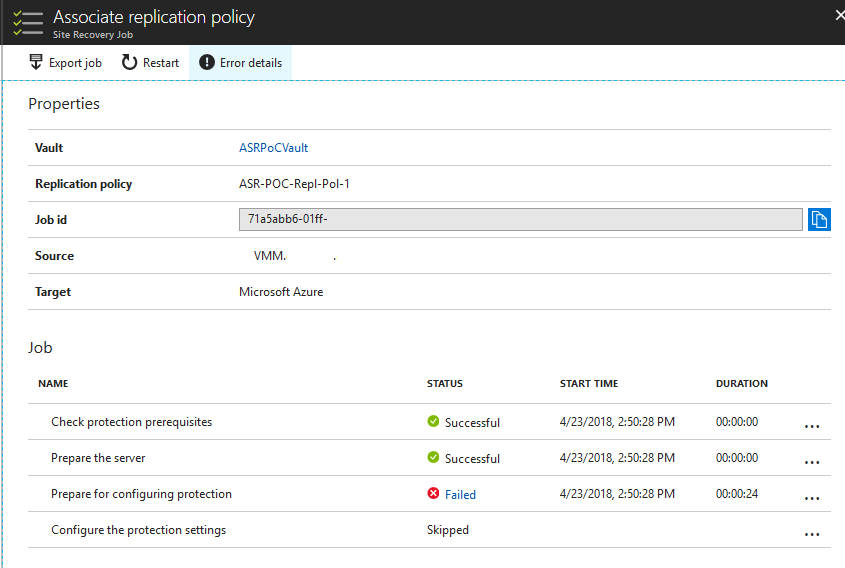
The text of the error was:
Error ID
10003
Error Message
Protection couldn't be configured for cloud/site POC-ASR.
Provider error
Provider error code: 31408

Provider error message:

	Failed to fetch the version of Microsoft Azure Recovery Services Agent installed on the Hyper-V host server . Error: An internal error has occurred trying to contact the  server: : .

WinRM: URL: [http://:5985], Verb: [INVOKE], Method: [GetStringValue], Resource: [http://schemas.microsoft.com/wbem/wsman/1/wmi/root/cimv2/StdRegProv]

Check that WS-Management service is installed and running on server .

Provider error possible causes:
	It is possible that Registry provider of WMI is corrupted.

Provider error recommended action:
	Build the repository using MOF compiler and retry the operation.
This occurred right before I was distracted by other items so I didn’t directly troubleshoot. When I came back to the Azure Portal (in a fresh session) I had a surprising new message greeting me at the Recovery Services Vault blade:
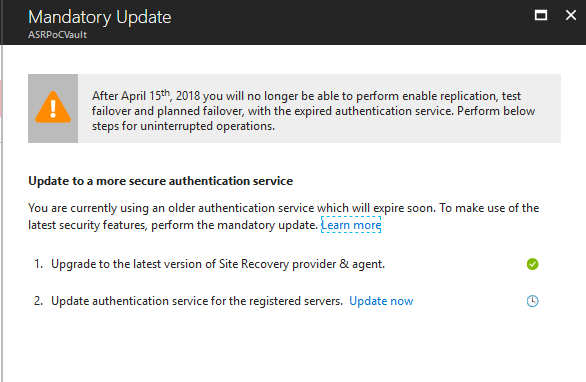
This was very odd, since I had just installed the latest version of the Site Recovery provider on my VMM host, as well as the MARS agent on my Hyper-V hosts. But when I clicked “Update Now” it listed my VMM host and displayed a new button to “Update Authentication Service”.
This almost immediately error-ed out:
Error ID
635
Error Message
Updating authentication service information for server -  failed.
Provider error
Provider error code: 31437

Provider error message:

	Failed to fetch the version of Microsoft Azure Site Recovery Agent installed on the Hyper-V host(s) '' as the host is not reachable.

Provider error possible causes:

      1. Windows Management Instrumentation service crashed.
      2. Windows Remote Management (WinRM) service is not running.
      3. Required services may not be running on the Hyper-V host(s)''.

Provider error recommended action:

      Ensure that
      1. A firewall is not blocking HTTPS/HTTPS traffic on the Hyper-V host.
      2. If the server is running windows Server 2008 R2, ensure that KB 982293 is installed on it. Refer to https://aka.ms/kblink982293 for more details.
      3. The Hyper-V Virtual Machine Management service is running.
      4. Ensure that the Windows Management Instrumentation service is running on the Hyper-V host(s).
      5. Ensure that the Windows Remote Management (WinRM) service is running on the Hyper-V host(s).
      6. Verify that CredSSP authentication is enabled on the service configuration of the Hyper-V host(s). To enable the CredSSP on the service configuration, run the following command on the Hyper-V host, from an elevated command line: winrm set winrm/config/service/auth @{CredSSP="true"}.
      7. The Provider version running on the server is up-to-date. Download and install the latest Microsoft Azure Site Recovery Provider.
      8. If the error persists, retry the operation and contact support.
I validated all the components in the list here, checked the referenced articles, ensured WMF was updated to 5.1, to no avail.
I finally stumbled upon this post on the Microsoft forums where a check was done against WMI for the object “StdRegProv”, which is mentioned in the original error from the replication policy. Turns out this was my problem too! When I ran the WMI query it returned an error of “Exception calling “GetStringValue” : “Provider not found “” on 3 of my 4 Hyper-V hosts:
$hklm = 2147483650
$key = "Software\Microsoft\Windows\CurrentVersion\Uninstall\Windows Azure Backup"
$value = "DisplayVersion"
$wmi = get-wmiobject -list "StdRegProv" -namespace root\cimv2
($wmi.GetStringValue($hklm,$key,$value)).svalue |
$hklm = 2147483650
$key = "Software\Microsoft\Windows\CurrentVersion\Uninstall\Windows Azure Backup"
$value = "DisplayVersion"
$wmi = get-wmiobject -list "StdRegProv" -namespace root\cimv2
($wmi.GetStringValue($hklm,$key,$value)).svalue
I ran the mofcomp command, and then when I ran the last line of the previous query ($wmi.GetStringValue) it returned a value instead of an error.
cd c:\windows\system32\wbem
mofcomp regevent.mof |
cd c:\windows\system32\wbem
mofcomp regevent.mof
Following this, the “Update Authentication Service” job completed successfully, and I was able to associate my replication policy without further problems.